THE SHORT ANSWER
Treat submission as a sequence of confirmed handoffs. A saved resume or a started application does not establish that the agency received every required component.
What to keep in mind
- Verify the agency application, not only the USAJOBS document library.
- Record the announcement number, receipt and remaining deadlines.
- Report technical problems with precise times and screenshots through the stated support channel.
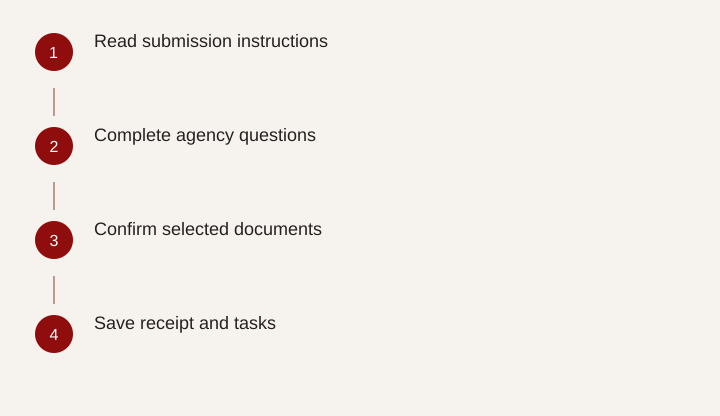
- Read submission instructions
- Complete agency questions
- Confirm selected documents
- Save receipt and tasks
Follow the application beyond the first website
The last few minutes of a federal application deserve the same attention as the resume. Applicants can remember uploading a document and still be uncertain whether they completed the agency questionnaire, attached the correct version or pressed the final submission control. The useful question is specific: what evidence shows that this vacancy received my completed package?
The USAJOBS application-process guidance describes a handoff from USAJOBS to the hiring agency's application system. Your account can therefore contain documents while a particular agency application remains unfinished. Read the announcement's How to Apply and Required Documents sections before starting. Note any separate assessment, questionnaire or other task, including its deadline. A checklist written before the handoff is easier to follow than reconstructing the process after the vacancy closes.
Identify the exact vacancy and submission window
Create a small application record with the announcement number, agency, position title, grade choices, location choices and closing time. Use the stated time zone. A job title alone is a weak identifier because an agency may advertise similar positions through different eligibility routes or for several locations. Save a copy of the announcement while it is available.
Look for early-closing language or an application cap as well as the displayed closing date. Schedule your own completion target with enough margin to resolve a missing file or interrupted session. That margin is a planning choice, not an extension of the official deadline. If the announcement's instructions appear inconsistent, use its listed contact to request clarification promptly. Do not assume that another vacancy's application sequence or document rules apply here.
Check selected documents against the actual requirements
Compare the agency's attachment list with the announcement, one item at a time. A file stored in your USAJOBS account is not necessarily the file selected for this application. Open the selected resume and confirm the vacancy-specific version. Check that transcripts or eligibility documents appear under an appropriate document category and that every page is readable.
The USAJOBS document guidance explains that required supporting documents vary by job. Avoid sending a large collection of unrelated records in the hope that a reviewer will identify the important pages. Follow the requested scope and protect sensitive information. For a transcript, confirm the institution, coursework and relevant degree information are visible. For an eligibility document, check that it actually supports the route you selected. File names help you organize; readable contents establish what you submitted.
Use a submission receipt checklist
Use the following checklist at the final screen, adapting it to the agency system. Not every portal presents the same fields. Where an item is unavailable, record that fact rather than inventing a confirmation.
| Checkpoint | Evidence to retain | If something is missing |
|---|---|---|
| Correct vacancy | Announcement number and grade/location selections | Return to the selection screen before submitting |
| Complete questionnaire | Final review or completion indicator | Resolve unanswered required items |
| Required attachments | Selected file names and readable copies | Attach the correct version |
| Submission accepted | Receipt, confirmation screen or message with date | Check the agency system and its instructions |
| Later tasks | Assessment or onboarding message and due date | Set a separate reminder |
Retain your own copy of the materials as submitted. Later editing of your general resume library can make it difficult to reconstruct what the reviewer actually saw. A dated folder for each announcement solves that problem without requiring elaborate tracking software.
When the screen, email and status do not agree
A delayed email or unfamiliar status label does not by itself prove failure. Reopen the application through the official tracking route and examine the agency's record. The USAJOBS status guidance directs applicants to agency information for application details. Compare the exact vacancy, timestamp and task described in each message.
If the portal shows an outstanding required item, act on that item while the deadline remains open. If you cannot determine whether submission succeeded, contact the announcement's agency contact with a narrow request: please confirm receipt for this announcement and identify any incomplete component. Avoid repeatedly submitting unrelated versions merely to create more receipts. If an update is permitted, follow the system's instructions and confirm that the update itself is complete. Preserve both the earlier receipt and the final record.
Document an outage without assuming an exception
A useful technical report states observable facts: “For announcement ABC-123, I attempted the final submission at 8:42 p.m. Eastern on October 10. The page displayed the attached error after I selected Submit. My application identifier is 456. Please advise how to confirm receipt and whether any further action is available.” This is an illustrative template; replace every detail with your own record.
Include a screenshot that excludes passwords, full Social Security numbers and unrelated account information. Identify the browser or device only when relevant to support. Send the report through the channel specified by the agency or system, and keep the ticket number. A documented error does not guarantee acceptance after the deadline. Once the immediate issue is handled, review why your process reached the final minutes and adjust the next application. The practical goal is a verifiable package with enough time to resolve ordinary problems.
Related questions
Does uploading a resume to USAJOBS submit an application?
No. You still need to apply to the specific announcement, select the required documents and complete the agency's submission steps.
Can a support ticket guarantee a late application will be accepted?
No. A ticket documents the problem. The announcement and the agency's response determine what options, if any, are available.
Sources & further reading
Primary references
- USAJOBS: How does the application process work?
- USAJOBS: Application documents
- USAJOBS: Application and job status
Community questions behind this guide
These discussions informed the question and language. Personal accounts are not verified facts or professional advice. Read our method.